
Download the latest version or browse previous releases.
Recowise is distributed outside the Mac App Store. macOS may show a security warning on first launch. Follow these steps to open the app:
Double-click the downloaded Recowise-1.0.1.dmg file and drag the app into your Applications folder.
Double-click Recowise in your Applications folder. macOS will show a warning dialog saying it cannot verify the developer. Click Done (or "OK") for now.
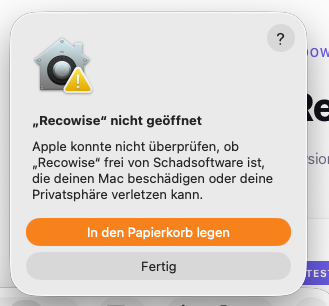
Open System Settings > Privacy & Security. Scroll down to the Security section. You will see a message that "Recowise" was blocked. Click Open Anyway.
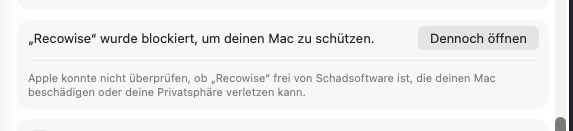
macOS will ask one more time. Click Open to confirm. The app will now launch normally every time.